Made in Trinidad & Tobago
Stop taking bookings in your DMs.
Give your venue its own booking page. Your customers pick a time, pay by debit or credit card, and it lands on your calendar — no back-and-forth, no bank transfer screenshots, no double-booked Saturday.
Nothing to join and no monthly fee. Takes about a week to set up, and we do the setting up.
Right now, a booking looks like this
You already have the customers. What you don't have is a way for them to book without going through you personally.
-
A missed call
The phone goes while you're on the court. You ring back after. They've already booked somewhere else.
-
Twelve unread DMs
Instagram, WhatsApp, and a Facebook message from Tuesday you still haven't seen. All of them asking about Saturday.
-
A screenshot of a transfer
Check the bank, match it to a name, write it in the book. Then do it again for the next one, and the one after that.
How it works
-
1
We set you up
Your venues, courts, opening hours and prices, put in for you — including the awkward ones. You don't start at an empty screen wondering what a "resource" is.
-
2
You share one link
Put it in your Instagram bio. It opens straight into your own booking page — your name, your logo, your colours, your sports. Nobody sees another business, and there's nothing to download.
-
3
You get booked and paid
Customers pick a slot and pay by debit or credit card there and then. It lands on your calendar while you're still on the court, and we pay you out.
Nothing to join, and no monthly fee.
No setup fee, no subscription, and no merchant account to open. You can put one court on and see whether it works before it costs you anything.
There is a service fee on each booking. We go through exactly how it works against your own prices when we set you up — no contract, and nothing to cancel if you decide it is not for you.
What you get
Everything below is built and running today.
-
Your own booking page
Your own web address, your logo, your two brand colours. Customers see your business, not a marketplace with your competitors on it.
-
Never double-booked
Two people cannot take the same court at the same time. The database refuses it outright — it isn't an app that checks and hopes.
-
One account, every venue
Somebody who has booked at another business on the platform already has a login that works at yours. One fewer reason to abandon a booking.
-
Programmes and camps
Clinics, leagues, holiday camps. Capacity enforced, whole-run or drop-in, and a waitlist that offers a freed place with a deadline.
-
Coaching
Coaches request to teach at your venue and you approve them. Their free time, your free court and your approval have to line up before a slot is offered.
-
Waivers
Written once, signed once, versioned. Enforced at checkout, so nobody reaches your court without having signed the current one.
-
Check-in at the door
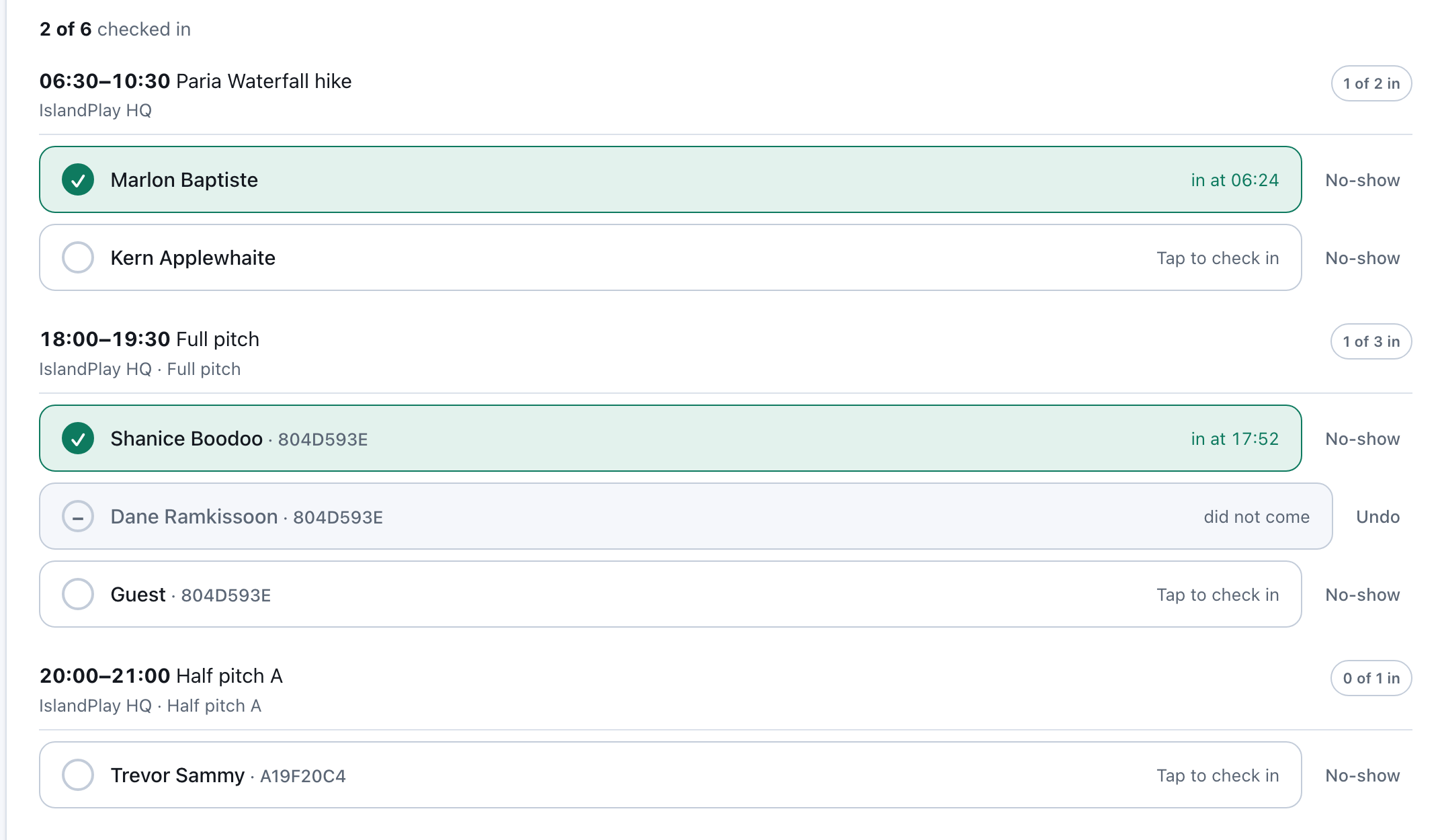
Search a name or a booking reference, one tap per person, and see "3 of 12 in" at a glance. No-shows marked by you, never guessed.
-
Equipment hire
List what you lend and what it costs. Customers add it at checkout, and a booking short of an item is refused rather than promised.
-
Memberships and passes
Pay for the month, then stop paying per session. Earned income counted month by month, so what you've actually earned and what you still owe are never the same number.
-
A calendar that's current
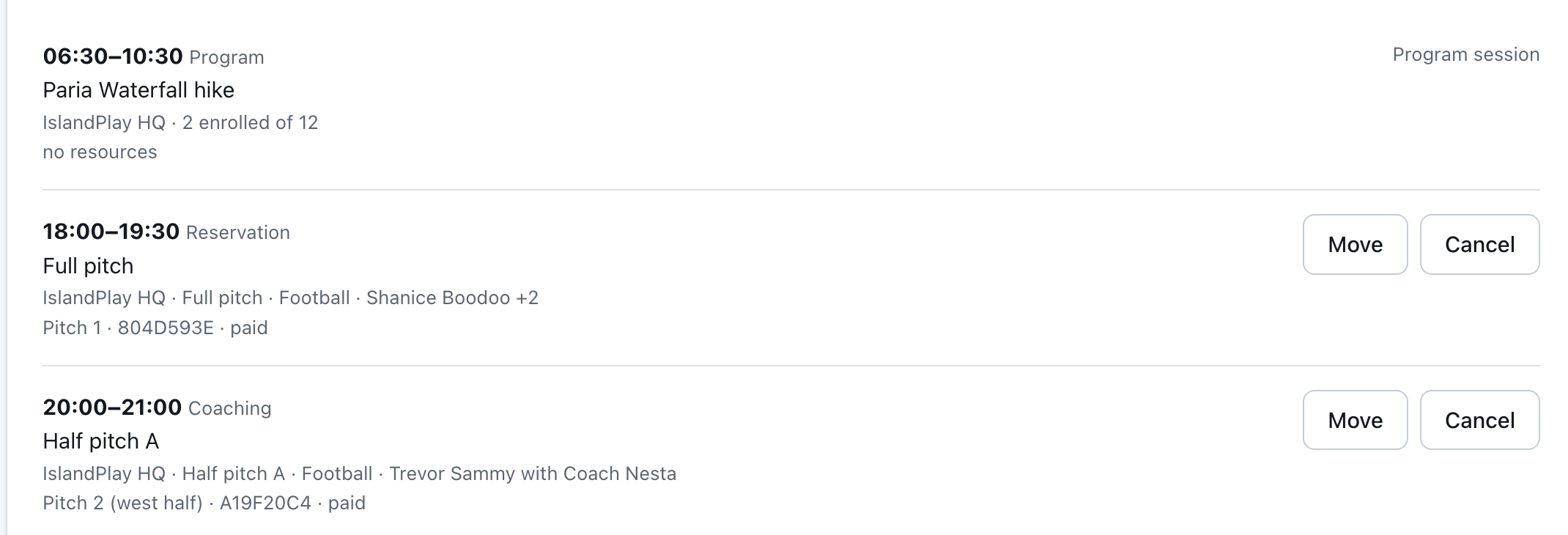
Reservations, coaching and programme sessions on one screen, refreshing on its own. Move a booking to another court without re-pricing it.
-
Revenue you can trust
Read from a double-entry ledger rather than added up on the way past. Refunds unwind properly instead of leaving a hole.
-
More than one venue
One business, many locations, many sports. Staff you invite yourself, with the books kept to the owner.
Built for how sport actually works here
Most booking software is written for one country's idea of a court. These are not settings we added — they're what the thing was designed around.
-
TT debit cards and credit cards
The Linx Visa Debit card their bank issued works, and that's what most people here carry. Every customer who'd have paid cash at the gate can pay you online instead.
-
One pitch, or two 5-a-side halves
Sell it whole on a Sunday and split it on a Tuesday. Book either half and the full pitch comes off sale by itself.
-
One slab, two sports
The same hard court sold as basketball or as pickleball. Book it for one and it's gone for the other, because it's the same concrete.
-
It says pitch, not court
A pitch for football, a net for cricket, a studio for wellness, a meeting point for a hike. Your customers read their own words.
-
Share it with your team
Book for ten and one link seats the other nine. Each of them signs your waiver themselves, so nobody is chasing signatures on a Saturday morning.
-
Your sport, even if we've missed it
Football, cricket, basketball, tennis and pickleball are there — so are hiking, dirtbiking and wellness. If yours isn't, you add it yourself.
Have a look at it
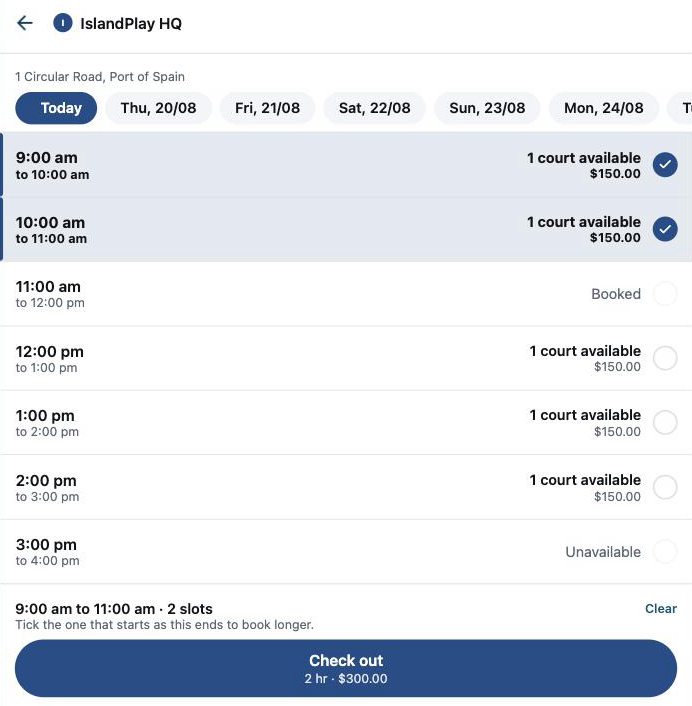
The actual screens, with real bookings in them — not an artist's impression.
Questions
- What does it cost?
- Nothing to join, nothing monthly, and no setup fee — so you can try it before it costs you anything. There is a service fee on each booking, which covers card processing, and we go through exactly how it works against your own prices when we set you up.
- How do I get paid?
- We collect the card payment and pay out what you are owed. You don't need your own merchant account and there's nothing for you to reconcile — every booking shows what came in and what is yours on your dashboard, read from the ledger rather than added up afterwards.
- Do my customers need to download an app?
- No. It opens in a browser, which is why a link in your Instagram bio is all the distribution you need.
- Can I use my own branding?
- Your name, your logo and two colours of your choosing. We check the colours are readable against the page before saving them, so your customers can still read the screen standing outdoors.
- Can I still take cash?
- Debit and credit cards today. Taking cash at the door and recording it against the booking is on the list, and we'd rather say so than pretend.
- What happens to my existing bookings?
- We put your courts, hours and prices in for you as part of setting up. Bookings already in your book stay in your book — you'd start taking new ones through the page.
Tell us about your venue
Ready now? The setup form takes about ten minutes on your phone, and we do the setting up from there.
Rather talk first? Leave your details and we'll come back to you within a couple of days.